Orthotics clinic management software

Orthotics software. Every step, connected.

Orthotics software that brings patient care and technical work together. Manage assessments, appointments, device orders, fabrication stages, and fitting follow-ups in LifeLink.

Now connected: AADL claim entry & predetermination →

One patient. One connected workflow.

Orthotics software connects clinical records with the work of making and fitting orthotic devices. LifeLink gives orthotists, reception teams, and technicians a shared place to coordinate that journey.

Patient recordsSchedulingTeam coordination
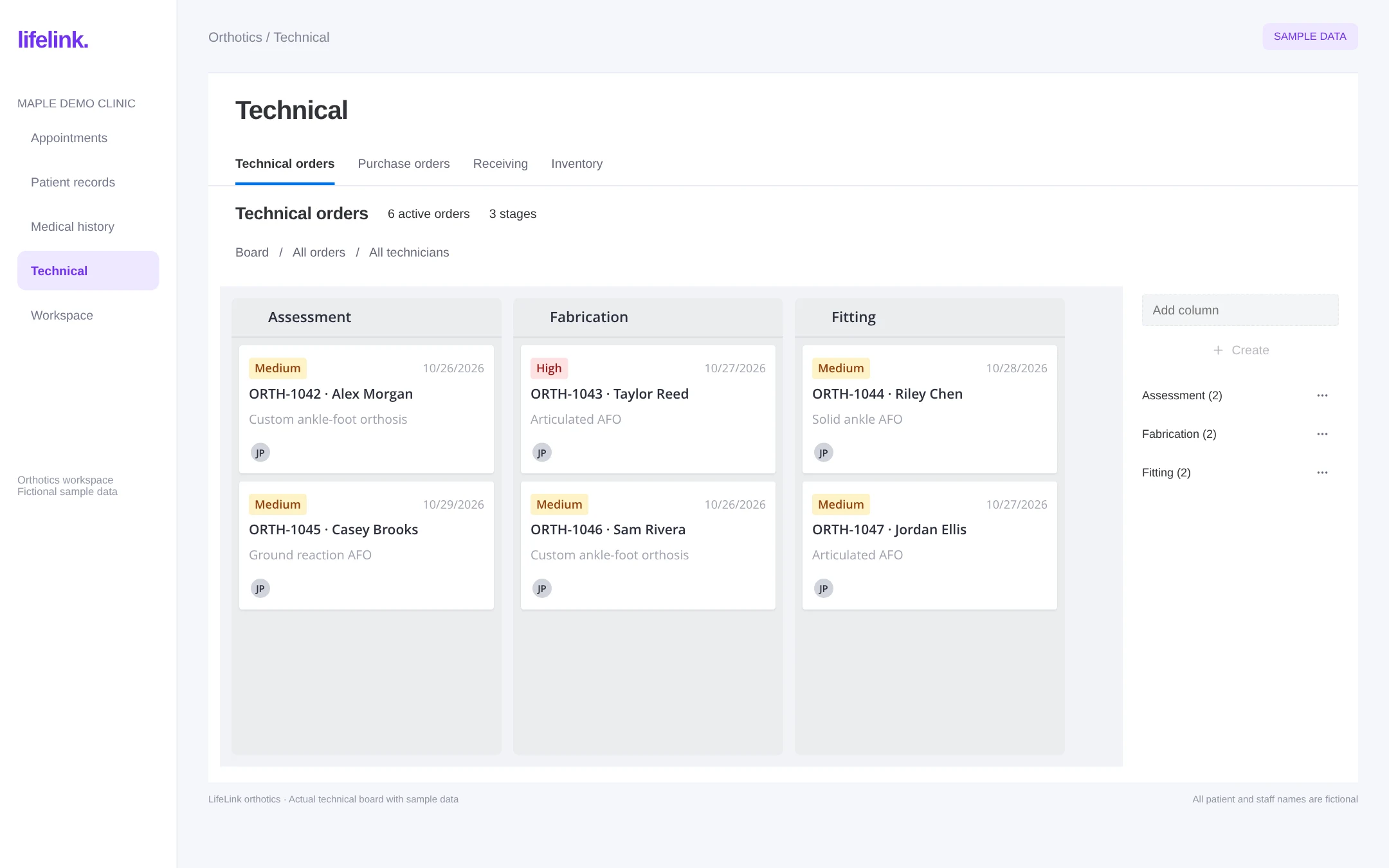
LifeLink orthotics technical order board interface with fictional sample data
Actual LifeLink orthotics board, rendered with fictional patients and work orders. Open the image to explore the detail.Full size

Now in LifeLink · Alberta Aids to Daily Living

Your patient chart.
Your AADL workflow.
Finally connected.

LifeLink connects orthotics and prosthetics clinics to the Alberta Blue Cross AADL portal. Send patient-linked claim details directly from LifeLink and review predetermination results in the same workflow.

Explore AADL submission support
  1. 01Connect your clinic’s AADL portal account
  2. 02Look up the patient from their chart
  3. 03Send claim details for predetermination
  4. 04Review AADL and patient amounts in LifeLink

Available now: patient lookup, claim entry, and predetermination. Final “Process claim” submission is not performed by LifeLink; predetermination is not a completed claim or a guarantee of payment.

The connected workflow

Less chasing updates.
More shared context.

From the first conversation to the next follow-up, keep the people doing the work connected to the information they need.

  1. 1

    Start with the patient, not a spreadsheet.

    Keep appointment history, clinical documentation, and orthotic orders connected to the patient. Give reception and clinicians the context they need for the next assessment.

    Patient records · Clinical notes · Appointments

  2. 2

    Give every orthotic order a clear next step.

    Follow work through assessment, measuring, casting, design, fabrication, quality check, and fitting. Use board views, priorities, due dates, and assigned technicians to coordinate the work.

    Technical orders · Board & timeline · Assigned owners

  3. 3

    Connect the clinic and the workshop.

    Link purchase orders to patient work, review receiving, and manage technical inventory in the same workspace. See what is ready and what still needs attention before a fitting.

    Purchase orders · Receiving · Inventory

  4. 4

    Keep the fitting in the care journey.

    Book the fitting, document the encounter, and arrange follow-up from the connected platform. Keep the clinical record alongside the device workflow as care continues.

    Fitting appointments · Charting · Follow-up

Built around the work orthotists do.

LifeLink’s orthotics workspace includes ankle-foot and knee-ankle-foot orthosis orders (AFO and KAFO), knee orthoses, upper-extremity orthoses, and spinal orthoses. Discuss your device categories, documentation requirements, and production stages during a workflow demo.

Map your workflow with us

Device-specific detail

Orthotic order management, beyond a patient name and a due date.

An orthotics work order needs to explain what is being made, who it is for, and what the technical team needs to know. LifeLink connects patient-linked orders with device specifications and shared production tracking. These are the device workflows available in the orthotics workspace.

AFO and KAFO orders

Ankle-foot and knee-ankle-foot orthosis workflows

The shared order workspace includes fields for device type, material, thickness, ankle angle, trimlines, padding, straps, colour, and special instructions. AFO type options include solid, articulated, ground reaction, posterior leaf spring, and carbon. Review KAFO-specific requirements during your demo.

Knee orthoses

KO order specifications

Record frame and joint details, flexion and extension stops, straps, and special instructions. Keep these specifications with the order so the technical team can review the requested configuration alongside its status and due date.

Upper-extremity orthoses

Upper-limb device documentation

Capture device type, pathology, joints, and special instructions in the upper-extremity order workflow. Connect the device request to the patient record rather than relying on a separate list of workshop instructions.

Spinal orthoses

TLSO, LSO, and CTLSO order options

Select the orthosis category and record pathology, levels, and special instructions. Device-specific fields make the handoff more precise while keeping clinical decisions with the treating professional.

Internal technical work

Repairs and other workshop tasks

Use internal technical orders for work that needs an order group, repair type, and notes. Track this work alongside device orders so a repair or modification remains visible to the team.

Clinic to workshop

Orthotic fabrication tracking your whole team can follow.

LifeLink tracks the operational progress of an orthotic order. The board supports stage changes, assigned technicians, priorities, due dates, and funding-hold information. List, board, timeline, and backlog views provide different ways to review the same work.

A stage such as design or 3D scan records progress in your workflow. It does not imply that LifeLink replaces CAD/CAM software, operates a scanner, or controls fabrication machinery.

See the order’s current stage

Follow work through assessment, measuring, casting, design, fabrication, modification, quality check, ready, fitting, and delivery. Configure board columns to reflect the way your clinic works, and use an on-hold stage when an order cannot move forward.

Keep responsibilities and changes visible

Review assigned technicians, priorities, and due dates together. Order comments, activity history, and materials give the team context when work changes hands. Reception and orthotics staff can access the technical workspace, with patient-specific work also visible from the chart.

Materials and handoffs

Connect orthotics purchasing, receiving, and inventory.

Knowing that an order is in fabrication is only part of the picture. The clinic also needs to know which purchase orders relate to the work and what materials are recorded against it. LifeLink brings technical orders, purchase orders, receiving, and inventory into the same workspace.

Patient-linked purchasing

Connect purchase orders with patient work and technical orders. Purchase-order records include supplier, status, order date, expected delivery date, and amount. This gives staff a place to review purchasing context when coordinating the next stage.

Materials and receiving

Record materials against technical orders and use the receiving and inventory areas for stock operations. During your demo, walk through a real purchasing scenario using de-identified information to confirm how your suppliers, materials, and receiving process fit the workspace.

Appointments and documentation stay part of the process.

Assessments, fittings, adjustments, and follow-ups each need scheduling and clinical context. LifeLink’s connected platform combines the technical workspace with appointment scheduling, clinical charting, patient communication, and the patient portal. Your team can evaluate the full care journey in the same demo.

Orthotics software for Alberta clinics

AADL documentation belongs alongside the patient’s care.

Alberta Aids to Daily Living (AADL) workflows involve program requirements as well as clinical and device information. LifeLink includes an orthotic coverage calculator in the patient chart, with saved calculator work and the ability to attach a calculator document to a treatment or diagnosis.

The orthotics workflow also includes catalogue-code and quantity/frequency coverage review. Staff can review funding-related information alongside the patient’s treatment documentation. A calculator result or coverage warning is decision support for clinic administration; it is not a funding authorization or a guarantee of payment.

Use current program information and the required verification process when assessing eligibility, approved benefits, cost sharing, and upgrades. Discuss your clinic’s funding and billing process in the demo, including which steps remain manual.

A practical buying guide

How to evaluate orthotics practice management software.

Start with one representative patient journey: assessment, device order, purchasing, fabrication, fitting, and follow-up. Ask each vendor to demonstrate that journey with sample data. The goal is to understand exactly where your team will work and where information will need to be transferred.

Orthotics software evaluation checklist
What to evaluateWhat to ask the vendor to demonstrate
Device documentationCreate an order for a device your clinic actually supplies. Review specifications, patient linkage, and revision handling.
Technical coordinationAssign a technician, change the stage and due date, add a comment, and show what reception can see.
Purchasing and inventoryLink a purchase order to patient work and show the receiving process and materials recorded against the order.
Funding and billingShow the calculator or funding documentation, required manual verification, and how patient charges are reviewed.
Scheduling and follow-upBook an assessment and fitting, then show clinical documentation and the patient communication workflow.
Migration, access, and supportConfirm which existing records can be imported, staff access requirements, training arrangements, and any integrations or costs.

Moving from spreadsheets or separate systems?

Inventory your current patient records, open work orders, device forms, supplier lists, and appointment types before planning a change. Identify which records need to move and which can remain in an archive. Ask LifeLink to confirm import scope, data mapping, training, and a rollout plan before setting a go-live date.

What does orthotics software cost?

Review the published LifeLink pricing information, then confirm the configuration for your orthotics team. Ask about the workflows included, staff and location needs, migration, training, and any additional services. A workflow demo helps clarify scope before a commercial decision.

Review LifeLink pricing ↗

Questions, answered

Choosing orthotics software?

Clear answers about LifeLink’s workflows, the current preview, and what to bring to your demo.

Can my clinic send AADL claim details directly from LifeLink?

LifeLink connects orthotics and prosthetics clinics to the Alberta Blue Cross AADL portal. Send patient-linked claim details directly from LifeLink and review predetermination results in the same workflow. Available now: patient lookup, claim entry, and predetermination. Final “Process claim” submission is not performed by LifeLink; predetermination is not a completed claim or a guarantee of payment.

Is orthotics software the same as CAD/CAM software?

No. Practice management and fabrication tracking software coordinate patient records, work orders, specifications, people, and production status. CAD/CAM tools design or manufacture devices. LifeLink’s design and scan workflow stages track progress; they do not by themselves indicate a scanner integration or CAD/CAM capability.

Can orthotics staff and reception review the same technical work?

Yes. LifeLink’s technical workspace is available in reception and orthotics staff dashboards, with patient-specific technical work accessible from the chart. Staff can review order progress while coordinating appointments and team handoffs.

Can LifeLink record orthotic repairs and modifications?

LifeLink includes internal technical orders with order group, repair type, and notes. Teams can use these alongside device orders to coordinate workshop tasks and track the responsible staff, stage, and due date.

How should a clinic evaluate orthotics software before switching?

Ask for a demonstration of one complete sample patient journey: assessment, device specifications, technical order, purchasing, fabrication, fitting, and follow-up. Confirm import scope, staff access, funding steps, integrations, training, and costs before agreeing on a rollout.

What is orthotics practice management software?

Orthotics practice management software helps a clinic manage patient records, assessments, appointments, device orders, technical work, and follow-up. LifeLink connects these clinical and operational workflows in one platform.

Can LifeLink track orthotic fabrication and fitting?

Yes. The orthotics technical workspace provides work orders with stages, priorities, due dates, assigned technicians, and board or timeline views. Teams can follow an order from assessment through fabrication, quality check, fitting, and delivery.

Which orthotic device workflows does LifeLink support?

The orthotics workspace includes AFO and KAFO, knee orthosis, upper-extremity, and spinal orthosis order workflows. A demo can confirm how your clinic’s device specifications and clinical forms map to the available workflows.

Does LifeLink include purchasing and inventory for orthotics?

Yes. The technical workspace includes purchase orders, receiving, and inventory. Patient-linked purchase orders help connect materials and supplier activity with the work being coordinated for a patient.

Can Alberta orthotics clinics review AADL coverage?

LifeLink includes an AADL orthotic coverage calculator in the orthotics workflow. It supports coverage review; it does not guarantee eligibility, funding approval, or payment. Clinics should verify current program requirements and patient eligibility.

Can I see the orthotics software without signing in?

Yes. This page shows the actual orthotics technical board with fictional sample records. Open the image to inspect it at full size, or book a demo to review the complete workflow with our team.

Can a combined orthotics and prosthetics clinic use LifeLink?

Yes. LifeLink supports shared clinic workflows for orthotics and prosthetics practices. The orthotics dashboard is the current visual reference on both solution pages. Discuss prosthetic device-specific requirements during your demo.
See LifeLink with your orthotics workflow.

Bring your appointment types, team handoffs, and documentation needs. We’ll walk through how they fit together.

30-minute call · No commitment · See it on your own workflows